
🎬 Best Free AI Websites for Video Editing
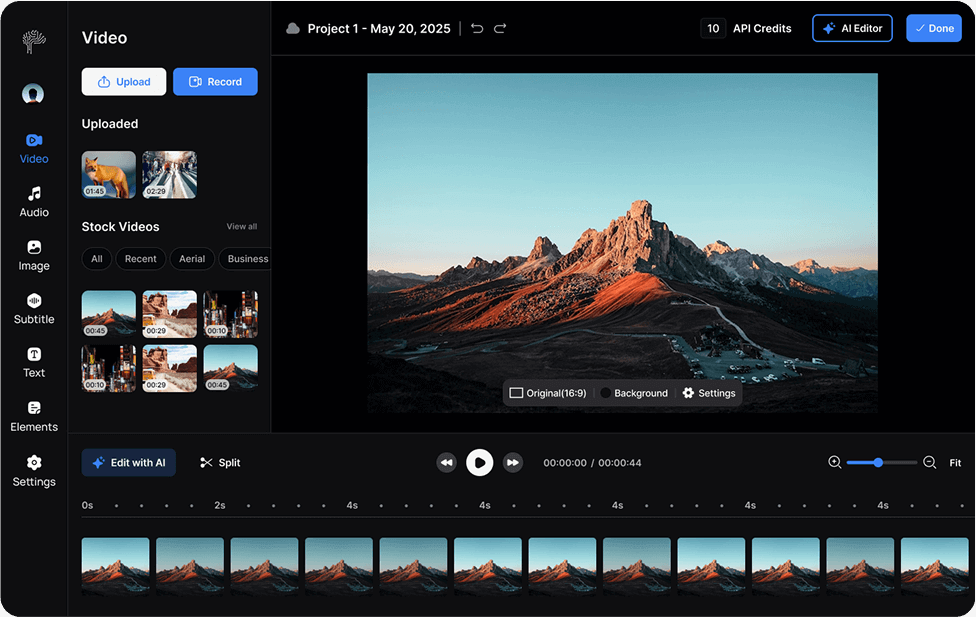
Best Free AI Websites for Video Editing (2026) , Free AI video editing websites have made high-quality production accessible to everyone. Platforms like Runway, CapCut, Clipchamp, and Canva offer smart tools that simplify complex editing tasks. From automatic subtitles to background removal and AI-powered transitions, these tools help creators produce professional content without expensive software.
📌 Uses of Free AI Video Editing Websites
These platforms are ideal for YouTubers, students, marketers, and social media creators. You can trim clips, apply filters, generate captions automatically, remove background noise, and even create videos from text scripts. AI features save time by automating repetitive tasks like syncing audio, resizing videos for different platforms, and suggesting highlight moments.
For promotional content, AI tools can quickly generate engaging short-form videos with animated text and smooth transitions. Educational creators can use auto-captioning to improve accessibility. Small businesses benefit from ready-made templates that make advertisements and product demos look polished without advanced editing skills.
🎥 Tips for Better Editing Results
Start with clean, high-quality footage. AI tools enhance videos best when the original material is clear and well-lit.
Use templates wisely. Customize colors, fonts, and transitions to match your brand instead of relying on default settings.
Keep pacing balanced. Avoid overusing flashy effects—simple cuts and smooth transitions often look more professional.
Take advantage of AI subtitles and adjust them manually for accuracy. Small corrections improve credibility.
Finally, export in the highest resolution available and preview before posting. Even free AI websites can deliver impressive results when used thoughtfully. With creativity and smart editing choices, you can produce stunning videos without spending a single dollar. Best Free AI Websites for Video Editing (2026)
🔹 Flixier – Browser-Based AI Video Editor
Flixier is a powerful AI video editing platform that works directly in your browser, requiring no downloads. It allows users to trim, merge, and enhance videos quickly using AI-powered tools. Features like automatic subtitles, AI voiceovers, and background removal streamline video production for social media, YouTube, and marketing campaigns. Beginners and professionals alike can benefit from Flixier’s intuitive interface and cloud-based workflow. You can edit high-resolution videos, apply transitions, and adjust colors automatically. The platform’s speed and AI integration make it one of the top free online editors for anyone wanting AI-assisted video editing without software hassles.
🔹 Clipfly – Simple AI Editor with Templates
Clipfly provides a beginner-friendly platform for AI video editing using pre-made templates and drag-and-drop functionality. Users can trim, crop, add transitions, text overlays, and auto-generated captions in minutes. Its AI tools simplify complex edits like background removal and image-to-video animations, perfect for social media content. Clipfly’s free version allows small projects without watermarks, making it ideal for beginners testing AI video capabilities. The platform emphasizes speed, simplicity, and automation, helping creators understand how to edit AI videos efficiently while still producing high-quality results suitable for Instagram, TikTok, or YouTube content.
🔹 Kapwing – AI Script & Subtitle Tools
Kapwing is an online AI video editing platform that excels in text-to-video conversion, auto captions, and script-based editing. Users can create videos from scripts, enhance audio automatically, remove backgrounds, and generate voiceovers. AI-powered trimming and alignment features make editing faster and more accurate, saving hours of manual work. Kapwing also provides templates optimized for social media platforms, making it easier to repurpose videos for YouTube Shorts, Instagram Reels, or TikTok. With its browser-based interface and smart AI tools, Kapwing is ideal for beginners and pros learning how to edit AI videos without complex software.
🔹 MindVideo – Prompt-Based AI Video Editing
MindVideo offers a unique approach to AI video editing, allowing users to make edits simply by typing instructions. You can remove objects, replace backgrounds, or change styles across entire clips using natural language prompts. Its AI engine analyzes each frame to produce professional-quality edits automatically. This is perfect for creators looking to produce cinematic content quickly without technical expertise. MindVideo also allows batch edits and supports multiple output formats, making it ideal for social media and marketing campaigns. Learning how to edit AI video on MindVideo is fast and beginner-friendly, providing high-quality results in minutes.
🔹 Pixara – AI Enhanced Video Creator
Pixara combines stock video, music, and AI editing tools to produce professional content quickly. Its AI assists in trimming, transitions, voiceovers, color adjustments, and adding effects automatically, simplifying AI video editing for beginners and content creators. Users can generate short marketing clips, social media content, and tutorial videos with minimal manual effort. Pixara’s interface is intuitive, allowing creators to experiment with styles and effects while AI handles repetitive tasks. This makes it one of the top free AI platforms to learn how to edit AI videos efficiently while maintaining high production quality for multiple online platforms.
